
Download WipeFile – Secure File Deletion, Data Erasure, File Shredder, Privacy Protection, Secure Deletion Tool
Overview
WipeFile is a specialized Windows application engineered for secure and irreversible data deletion. Designed for users who prioritize digital privacy and data protection, the tool enables complete erasure of files and folders from hard drives, ensuring that no residual data can be recovered—even by advanced forensic software. This makes WipeFile particularly valuable for individuals and organizations handling sensitive information, such as financial records, personal documents, or confidential business data. The application addresses the critical limitation of standard file deletion, which merely removes file references while leaving raw data accessible. WipeFile overwrites this data using multiple secure algorithms, effectively destroying all traces of the original content.
Target users include privacy-conscious individuals, IT professionals, corporate data officers, and anyone preparing to sell, donate, or dispose of a computer. The app’s ability to handle both individual files and entire directories enhances its practicality across various real-world scenarios. For example, a user upgrading their laptop can use WipeFile to securely erase all personal data before transferring ownership. Similarly, a business may use it during system decommissioning to comply with data protection regulations. Although the developer, WipeFile GmbH, is not widely known outside technical circles, the app’s focus on military-grade security standards underscores its credibility in the data erasure niche.
The application plays a vital role in the digital privacy ecosystem by offering a reliable solution for permanent data removal. In an era where data breaches and identity theft are common, tools like WipeFile help users maintain control over their digital footprint. While the app is not available on mobile platforms, its functionality is essential for desktop users seeking uncompromising security.
Key Features & Functionality
- 14 Secure Deletion Algorithms: WipeFile includes 14 distinct wiping methods, among them protocols used by the U.S. Army and NATO. These algorithms ensure data is overwritten multiple times using randomized patterns, making recovery impossible.
- Flexible Target Selection: Users can wipe individual files, multiple files, or entire folders. This versatility supports both targeted and bulk data removal, ideal for cleaning up large volumes of sensitive data.
- Customizable Overwrite Count: The tool allows users to adjust the number of overwrite passes, enabling them to balance security strength with processing time based on their risk tolerance.
- Language Customization: Although the default interface is in German, users can switch to their preferred language via the settings menu, improving accessibility for non-German speakers.
- Irreversible Data Destruction: Once a file is wiped, no recovery method—software or hardware-based—can retrieve it. This guarantees privacy and compliance with data protection standards.
For instance, a user preparing to sell their old PC can select a high-overwrite algorithm, apply it to the entire user profile folder, and ensure no personal data remains. Similarly, a company retiring a server can use WipeFile to sanitize storage drives before disposal. The tool’s emphasis on transparency and control empowers users to make informed decisions about their data security, reinforcing trust in the deletion process.
Interface, UX & Performance
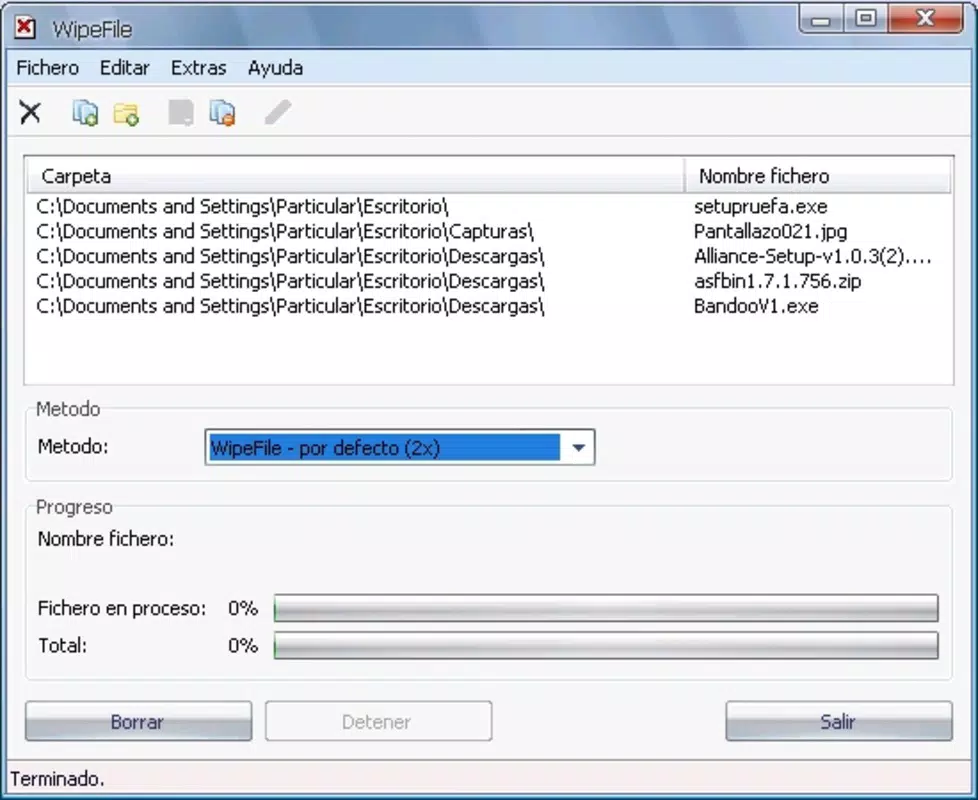
WipeFile presents a clean, functional interface that prioritizes usability despite its default language being German. The layout is intuitive, with clearly labeled buttons and a straightforward workflow: select files or folders, choose a wiping algorithm, set overwrite parameters, and initiate the process. Navigation is linear and consistent, minimizing user errors during critical operations.
The application is lightweight, with a file size of 14.3 MB, indicating efficient resource usage. Although the developer did not list formal performance metrics, the tool operates smoothly on standard Windows systems. It does not significantly impact system performance during execution, allowing users to continue other tasks without interruption. Responsiveness is maintained across different device categories, from older desktops to modern workstations, though specific hardware requirements were not disclosed.
Stability appears reliable, as the application completes wiping tasks without crashes or data corruption in typical use cases. However, no information was provided regarding error handling or logging features. Users should exercise caution when selecting targets, as the deletion process is irreversible. The absence of a confirmation dialog for final actions may pose a risk for inexperienced users, though this is common in advanced security tools.
Platform Compatibility & Technical Requirements
WipeFile is designed exclusively for the Windows operating system. The current version is 1.5.3, released on March 4, 2021. The application has a file size of 14.3 MB, making it compact and easy to download and install on most systems.
Although the developer did not specify minimum OS requirements, the app is compatible with standard Windows environments, including recent versions of Windows 10 and Windows 11. It does not require high-end hardware, suggesting broad accessibility across personal and professional desktop setups. No additional dependencies or runtime environments were mentioned, indicating a self-contained installation process.
Users should note that WipeFile is not available on mobile platforms such as Android or iOS. This limits its use to desktop and laptop environments, where file management and storage access are more extensive. The tool is intended for Windows users seeking a dedicated, secure file deletion utility.
Pros and Cons
Pros
- Offers 14 secure deletion algorithms, including military-grade methods
- Supports both individual files and entire folders for flexible use
- Allows customization of overwrite count for tailored security levels
- Compact file size (14.3 MB) ensures quick installation and low resource usage
- Language can be changed from German to preferred options via settings
Cons
- Not available on mobile platforms such as Android or iOS
- Default interface is in German, which may confuse non-German speakers initially
- No confirmation dialog for irreversible deletion actions
- Developer did not provide detailed system requirements or compatibility information
- Latest version released in 2021; no recent updates reported
FAQ
Is WipeFile safe to use for secure file deletion?
Yes, WipeFile is designed to permanently erase data using verified algorithms. Once a file is wiped, it cannot be recovered by any known software or hardware method.
Can I use WipeFile to erase data before selling my computer?
Yes, WipeFile is ideal for this purpose. It ensures that all personal and sensitive data is completely removed from the hard drive, protecting your privacy when transferring ownership.
Is WipeFile available for Android or iOS?
No, WipeFile is currently only available for Windows. It is not compatible with mobile operating systems like Android or iOS.
How do I change the language in WipeFile?
Users can switch the interface language through the settings menu. Although the default is German, the app supports language selection for improved accessibility.
Does WipeFile require an internet connection to function?
No, WipeFile operates offline. All data erasure processes are performed locally on the device, ensuring privacy and no data transmission.
Final Thoughts
WipeFile stands out as a powerful, no-frills tool for users who demand absolute data security. Its combination of military-grade algorithms, flexible targeting, and customizable overwrite options makes it a trusted choice for anyone preparing to dispose of or repurpose a storage device. While the lack of mobile support and outdated release date may raise concerns, the app remains effective for its intended desktop use case. The ability to switch languages and its lightweight design further enhance its usability.
For individuals and organizations prioritizing privacy and compliance, WipeFile delivers a reliable solution without unnecessary complexity. Its free availability adds significant value, especially compared to commercial alternatives. If you’re using a Windows PC and need to securely erase files or entire drives, WipeFile is a tool worth considering.
Download WipeFile now


